
 FirstMarketFX · CFD · Futures
The brokerage platform that carries your name.
Everything a broker needs to sign up clients, verify them, take deposits, offer trading, manage risk and pay partners, in one platform under your own brand.
Follow one client from sign-up to first trade, and see what your team sees.
Eight real screens from the FirstMarket platform, from the client portal to the admin back office. Each shows one stage of running a brokerage and who uses it.
Screens from a demo environment. Client names and emails are blurred for privacy.
Clients sign up in your branded portal
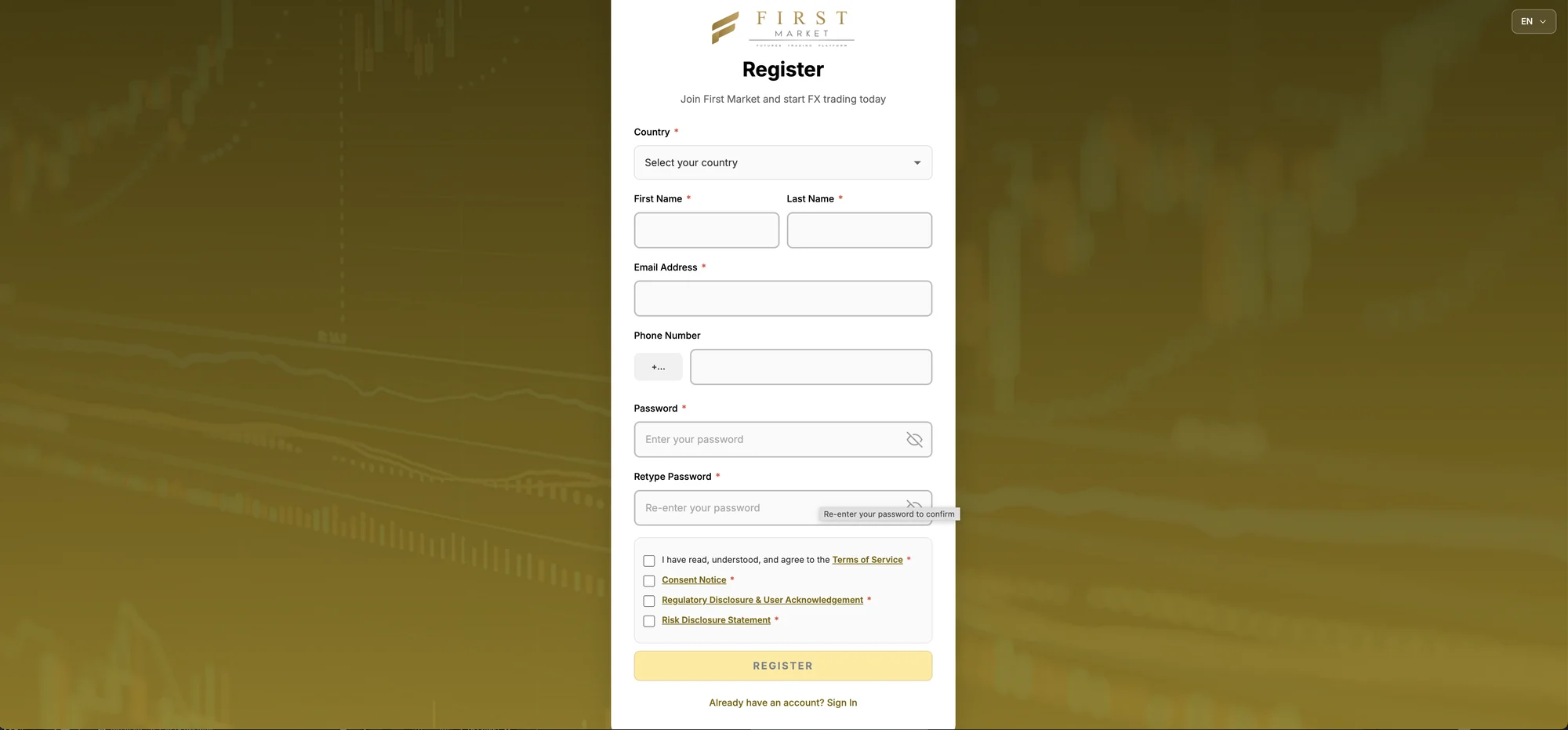
A new client lands on a sign-up page with your logo, colours and domain. They choose their country, enter their details and accept your terms, consent notice, regulatory disclosure and risk disclosure before the account opens.
- Your brand on the portal, emails and statements
- Every required disclosure accepted before the account opens
- Email or Google sign-in, on desktop and mobile
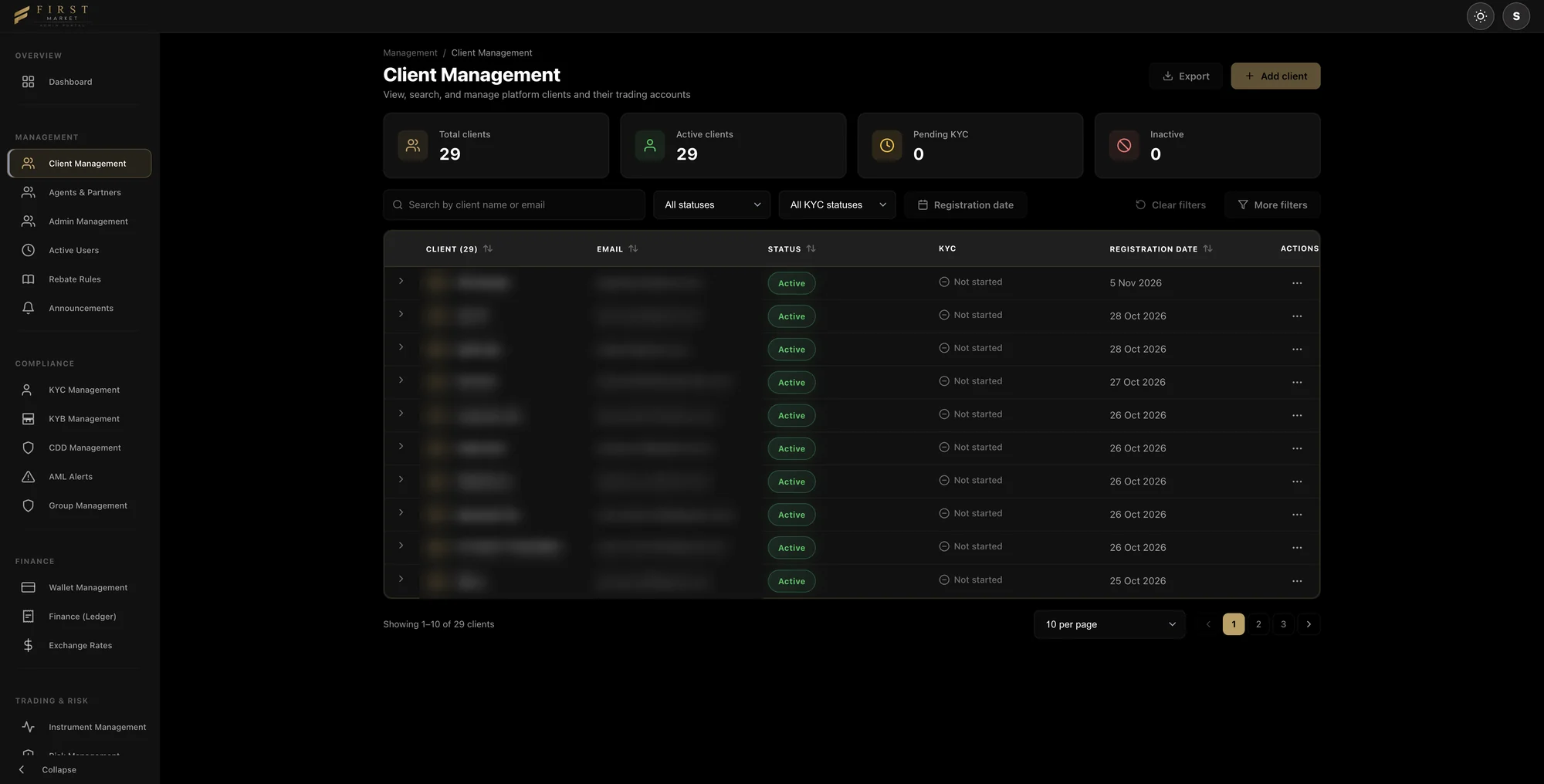
Every client in one back office
Each registration appears in Client Management with its account status, KYC stage and registration date. Your team searches, filters, exports and adds clients from one list, in a separate admin portal under your brand.
- Filter by account status, KYC status and registration date
- Export the client list, or add a client yourself
- Totals for active, inactive and pending-KYC clients at the top
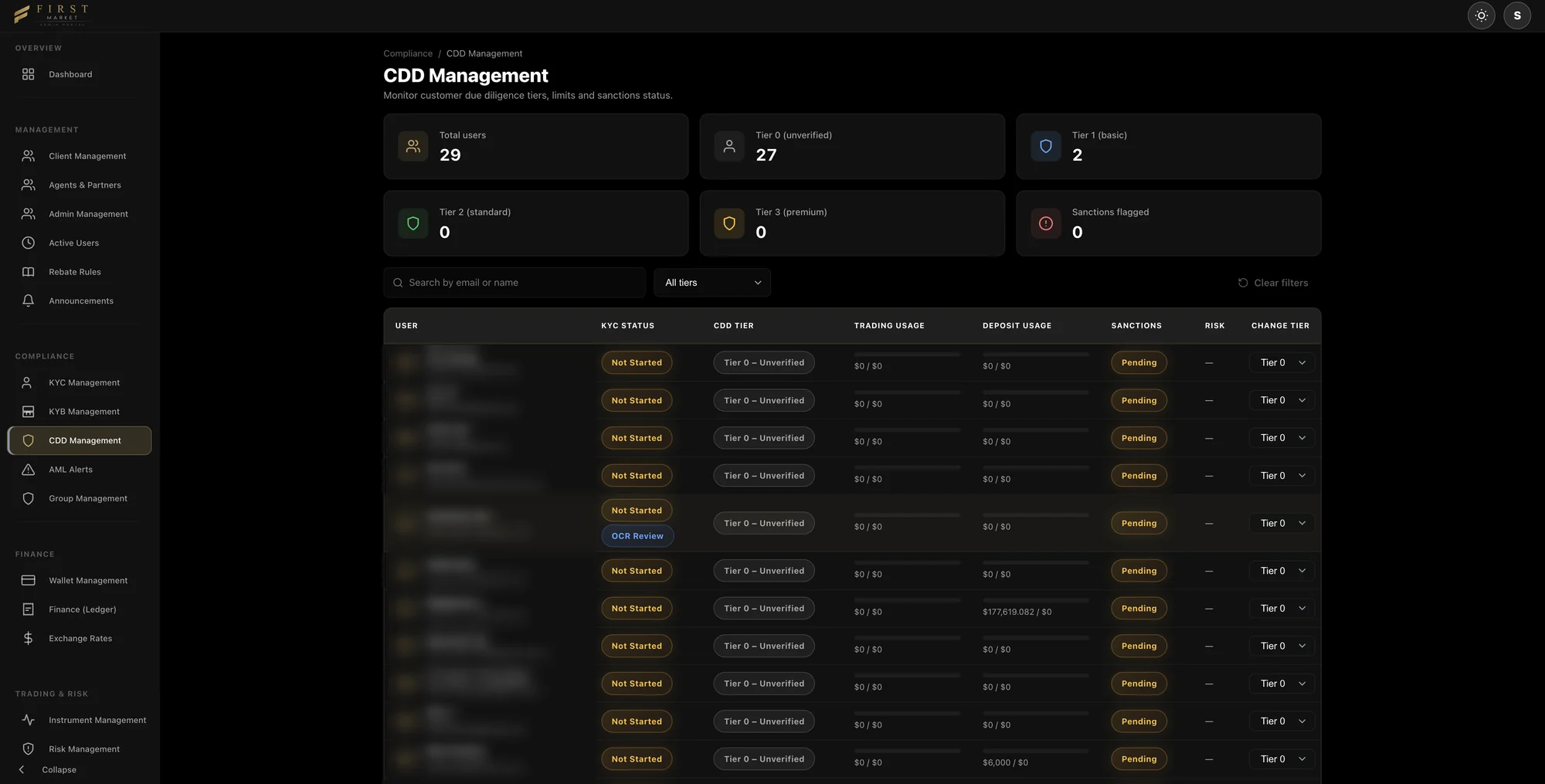
Compliance sets what each client can do
Customer due diligence tiers decide how much each client can trade and deposit. Officers see KYC status, tier, usage against limits, sanctions status and risk for every client, and move a client to a new tier in one step.
- Four tiers, from unverified to premium, each with its own limits
- KYC, KYB and CDD queues, with OCR review of uploaded documents
- Sanctions screening status and AML alerts in the same back office
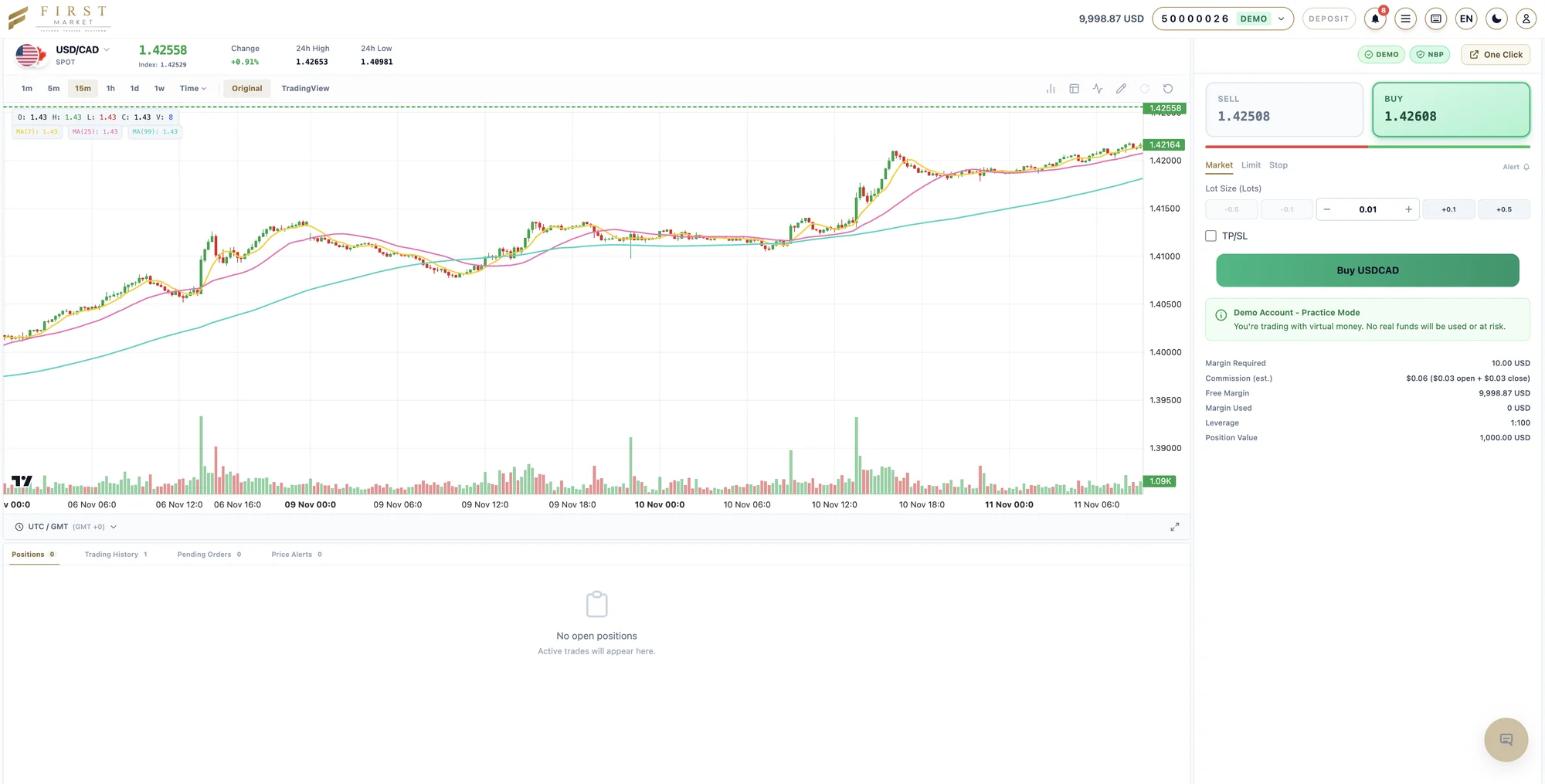
Clients trade on a professional web trader
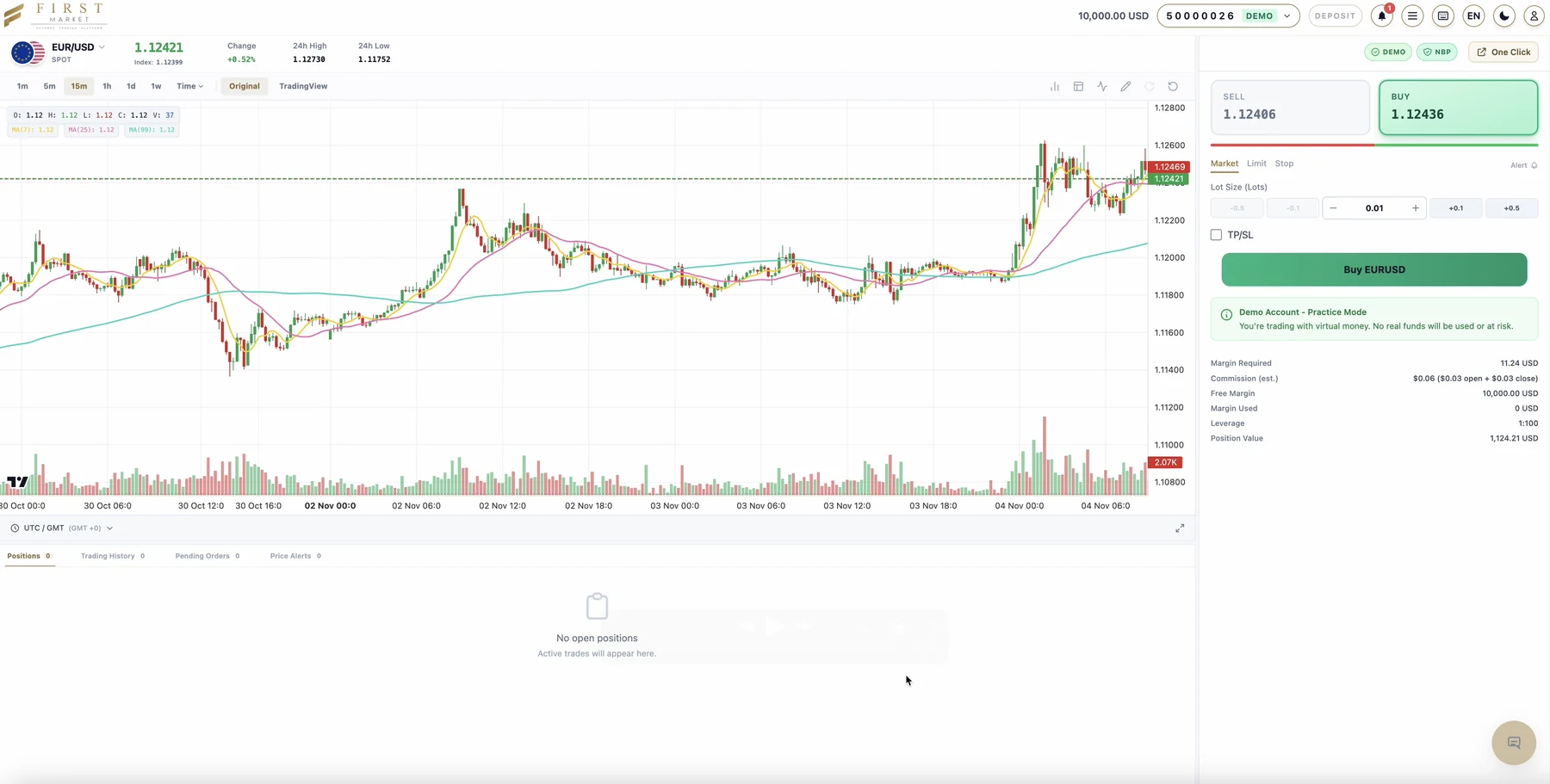
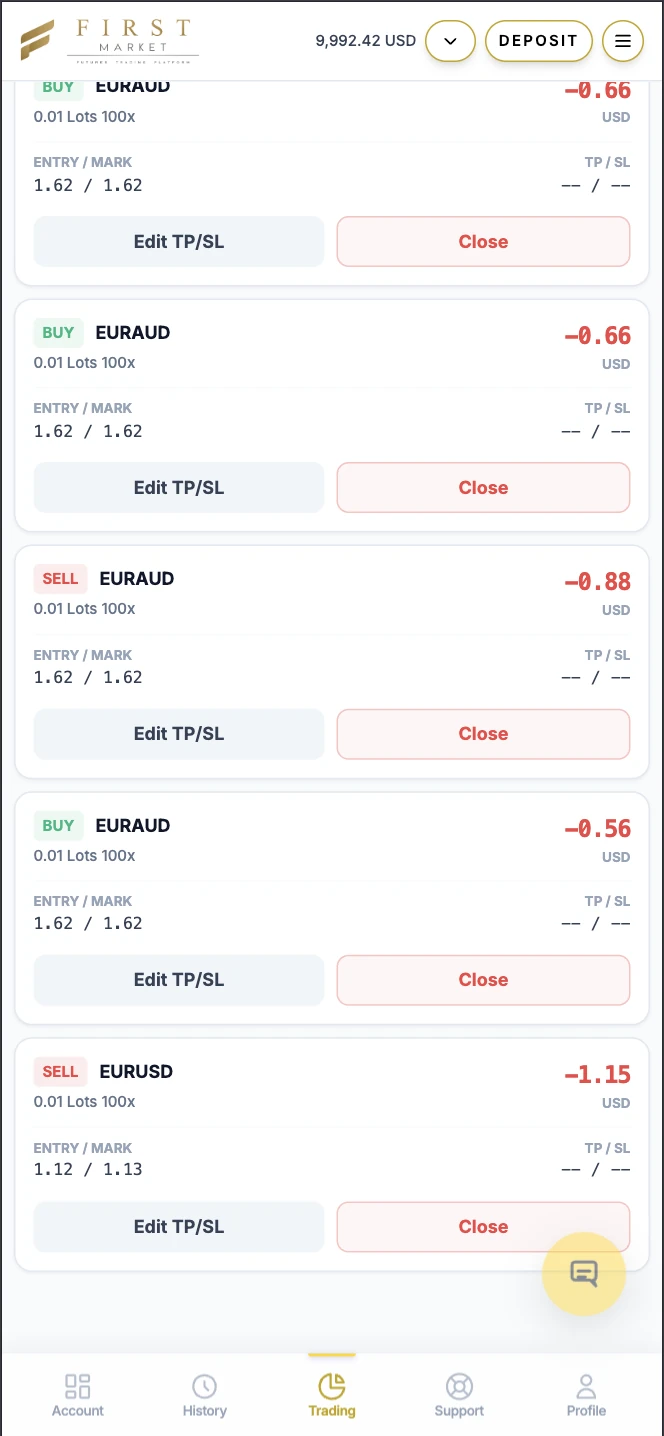
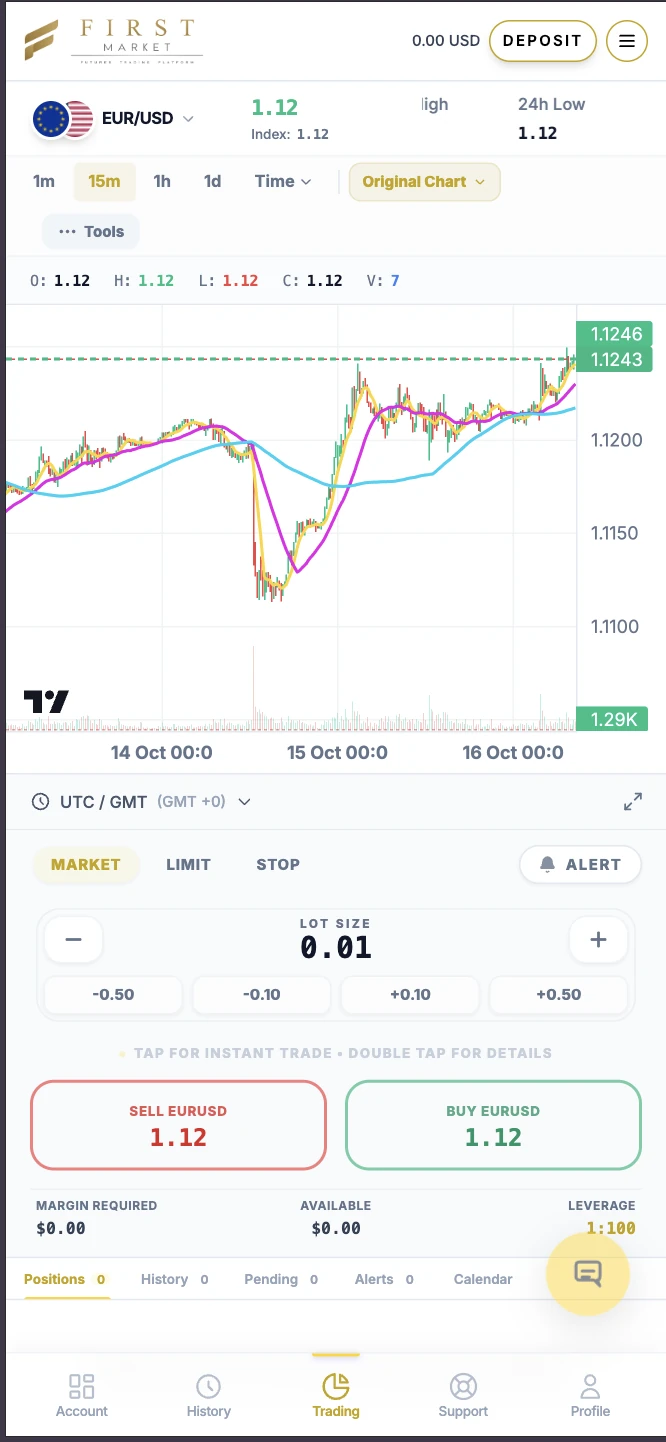
Approved clients fund their account and trade from the browser. Live charts run from one minute to one week, with moving averages and a TradingView view, beside an order panel that shows margin, commission and leverage before every trade.
- Market, limit and stop orders, take-profit and stop-loss, and price alerts
- Local deposit methods such as FPX, DuitNow, PayNow, PromptPay and QRIS
- Demo accounts with virtual funds for practice
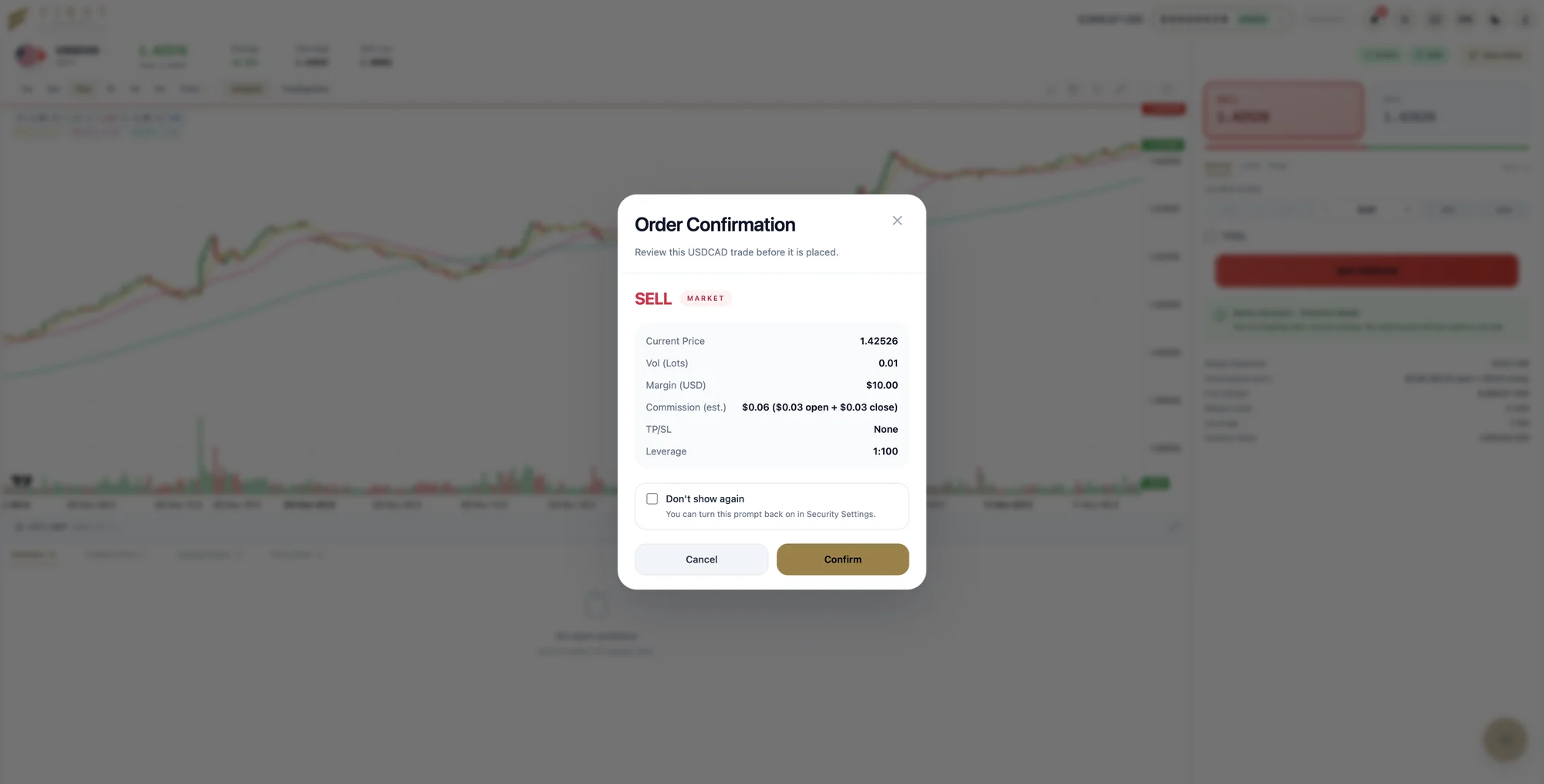
Every order is checked before it is placed
Before an order goes through, the client sees the price, volume, margin, commission and leverage, then confirms. Behind the scenes your risk team sets instruments, leverage and client groups, and decides which flow goes to liquidity providers.
- Leverage and margin set per instrument and client group
- A-book, B-book or hybrid routing rules
- A confirmation step, or One Click trading for experienced clients
Partners bring you clients, and get paid correctly
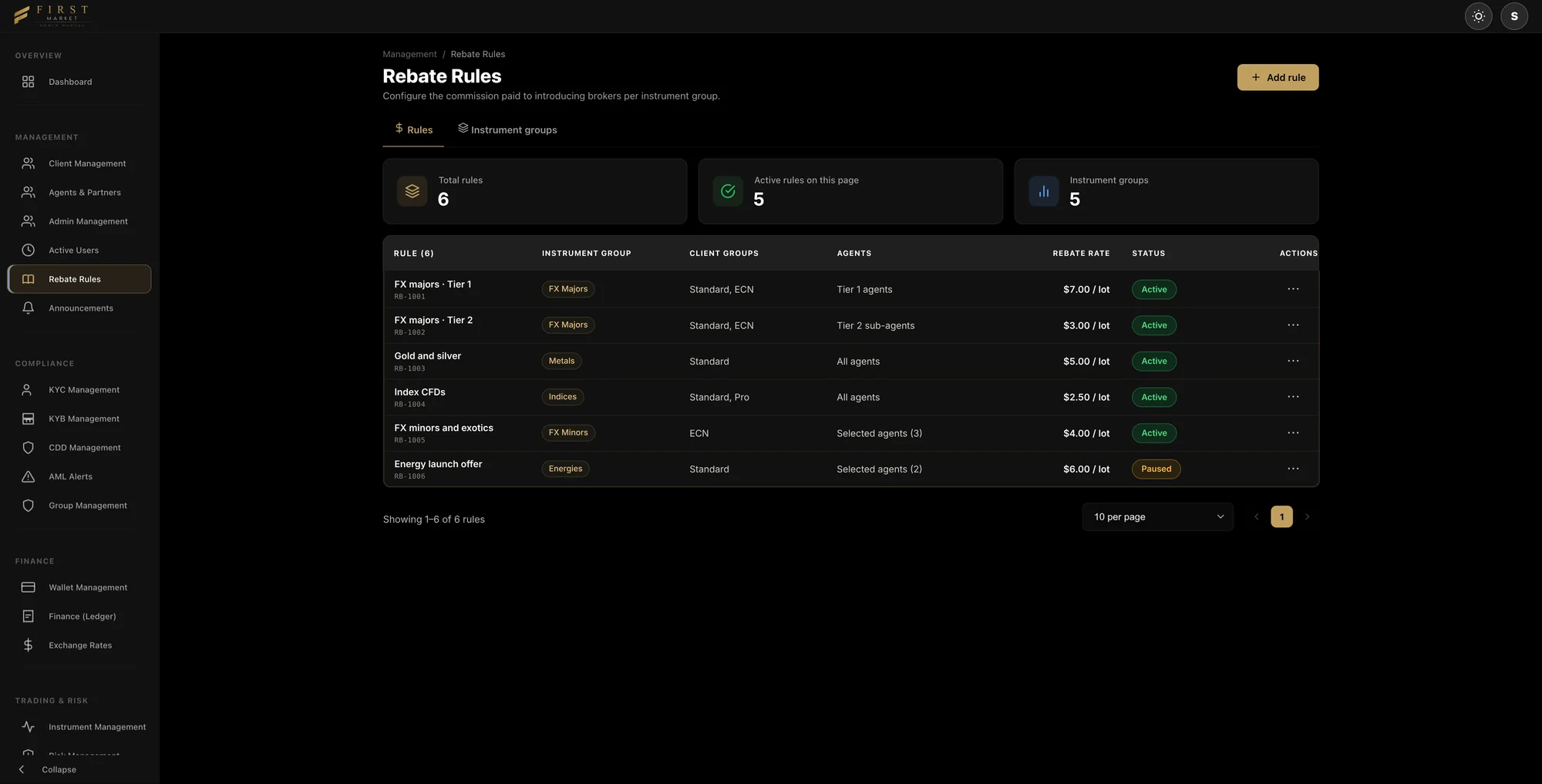
Introducing brokers and affiliates are managed in Agents & Partners. Rebate rules set what each one earns: pick an instrument group, the client groups and agents it covers, and a rebate per lot. The platform works out every payment, so your finance team does not have to.
- Rebate rates by instrument group, client group and agent
- Each rule applies to all agents or to the agents you select
- Pause, edit or add a rule at any time, without a code change
Every dollar posts to the ledger
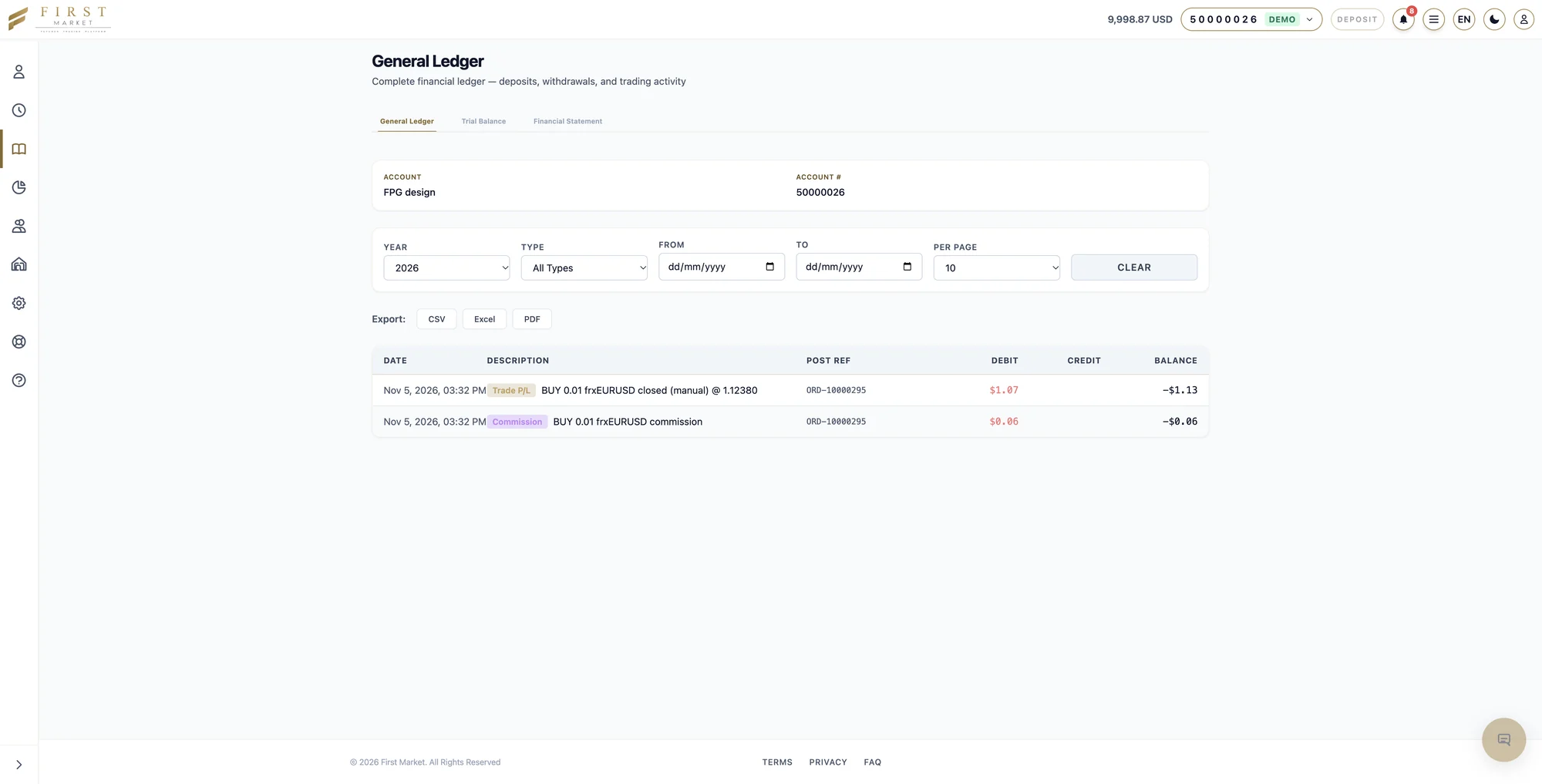
Each trading account has its own general ledger, trial balance and financial statement. Deposits, withdrawals, trade results and commissions are posted with an order reference and a running balance.
- Debit, credit and balance for every entry, with its order reference
- Filter by year, type and date range
- Export to CSV, Excel or PDF
Management sees what needs action
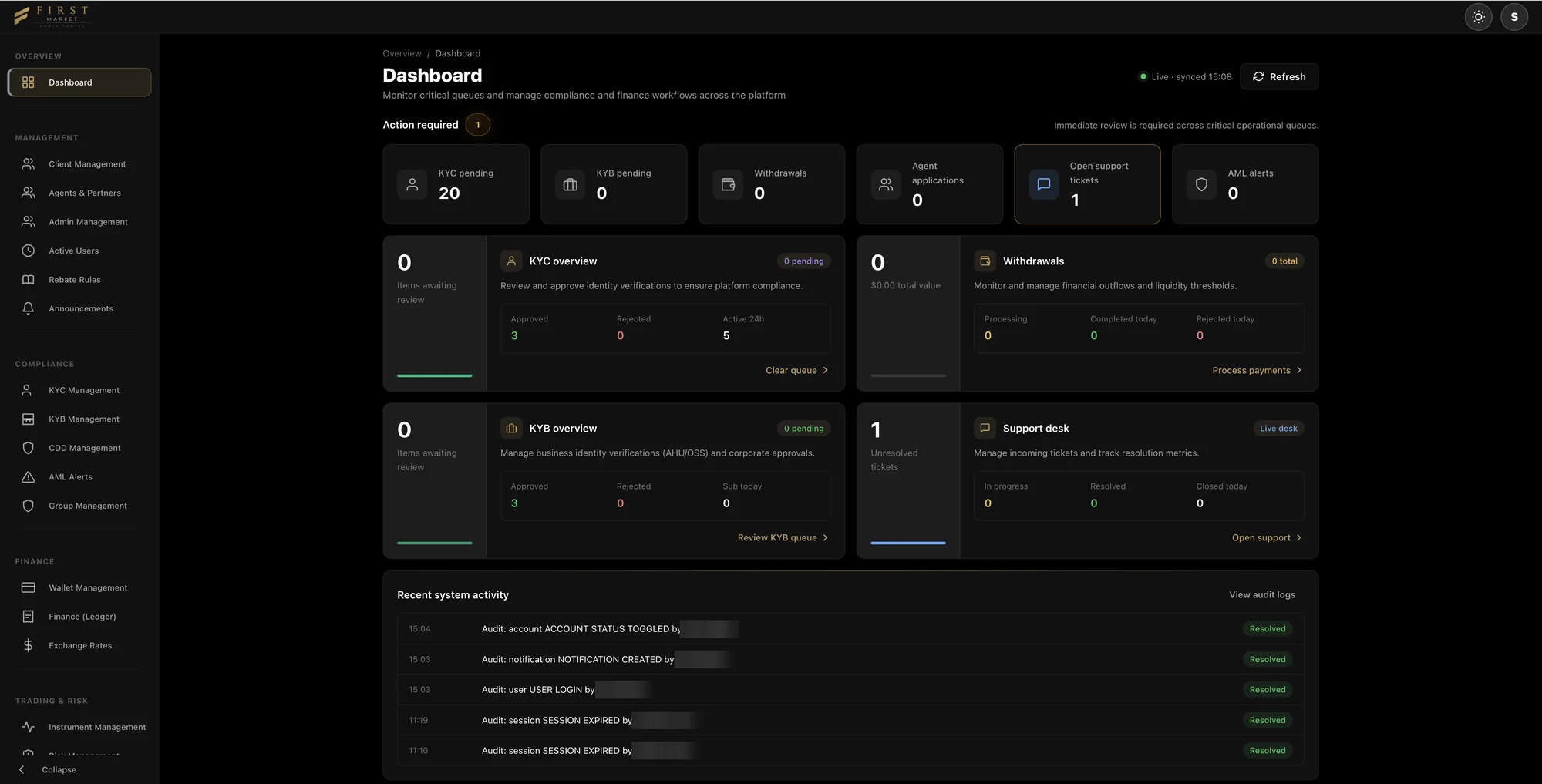
The admin dashboard opens on the queues that need attention: KYC and KYB reviews, withdrawals, agent applications, support tickets and AML alerts. Recent activity comes straight from the audit log.
- Live queues, each one click from its workflow
- An audit log of every sign-in, status change and notification
- Separate admin roles, so each team sees only what it should
How one order travels through FirstMarket.
Every trade follows the same controlled path, and every step is recorded.
One platform instead of six suppliers.
Most brokers stitch together a trading terminal, a CRM, a bridge, a payment page and a partner tool from different vendors. FirstMarket delivers them as one system with one login for your team.
Built to protect your margin, your data and your launch date.
Lower running cost, fewer suppliers, a faster start.
Three things brokers tell us matter most when they compare platforms.
Your costs stay flat as you grow
With a fixed fee, growth goes to your margin. With revenue share, your provider grows with you.
One partner instead of six
A typical launch means six suppliers to contract, integrate and chase.
Open sooner
A white-label is configured, not built. That is the difference between weeks and a year.
FirstMarket against the usual ways to launch a brokerage.
Three common alternatives, described by type rather than by name.
| FirstMarket | Provider A Terminal licence only | Provider B Global all-in-one suite | Provider C Several vendors combined | |
|---|---|---|---|---|
| What is included | Portal, CRM, trading, dealing desk, partners and payments as one system | Trading terminal. CRM, portal, bridge and payments bought elsewhere | Broad suite; many modules priced as add-ons | Whatever you assemble and integrate yourself |
| Pricing model | Fixed monthly fee. No revenue share | Set-up fee plus monthly fee, often rising with volume | Set-up plus monthly; volume-linked fees are common | A separate bill from each vendor |
| Company and licence help | Yes, from the same team | Not offered | Usually referred to third parties | You arrange it yourself |
| Built-in AI for your staff | KYC pre-checks, risk flags and drafted replies, with human approval | Not built in | Mostly assistants for traders, not for operations | Depends on each tool |
| Asian languages and local payments | Seven languages; local payment methods in each market | Through third-party plug-ins | Varies by region | You source and integrate them |
| Go-live and service levels | Written into the contract, with service credits | Rarely published | Standard terms; negotiated for large clients | No single commitment |
| Leaving with your data | Full export in standard formats within five business days | Depends on the vendor | Depends on the contract | Spread across several systems |
| Who you call | One named team in your time zone | The terminal vendor, for the terminal only | A global ticket desk | A different vendor for each problem |
Comparison reflects our review of publicly available information in October 2026. Other providers' terms vary by contract and may change. FirstMarket terms are confirmed in your proposal.
Pick the route that fits where you are today.
- Launch, Growth and Scale packages
- Typical go-live in four to six weeks
- Jurisdiction advice across ten brokerage regimes
- Platform built while the licence is in progress
- Works alongside your current terminal
- Move the rest across when you are ready
See FirstMarket with your logo on it.
A 30-minute walkthrough with a product specialist. We set the demo up in your brand, follow one client from sign-up to first trade and answer your questions on licensing, liquidity and cost.
- A reply within one business day
- A written proposal with fixed fees after the call
- No obligation